Tidbits

Version from Directory.Build.prop in .NET Framework projects

Most of the time when working with multiple projects in a solution I want to set the version globally using the Directory.Build.props file. That way I only have to update the version in one file, rather than all project files.
While this works great for SDK style projects, it doesn’t work well with .NET Framework projects. Basically, whatever value I have set in the .props file is read once when I open the solution and any changes are ignored until I close and reopen the solution.

As a workaround I use this small target in Directory.Build.targets to actively read the Version property from the .props file and write it into a separate version info file in every Framework project before every build.

Here’s a quick reminder regarding the two Directory.Build files.


<Target Name="SetAssemblyVersion" BeforeTargets="BeforeBuild"  Condition="'$(TargetFramework)'==''">
  <!-- Read the Version property from the .props file -->
  <XmlPeek XmlInputPath="$(MSBuildThisFileDirectory)Directory.Build.props" Query="/n:Project/n:PropertyGroup/n:Version/text()"
           Namespaces="&lt;Namespace Prefix='n' Uri='http://schemas.microsoft.com/developer/msbuild/2003' /&gt;">
    <Output TaskParameter="Result" ItemName="PropVersion"/>
  </XmlPeek>
 
  <!-- Prepare the attribute -->
  <ItemGroup>
    <AssemblyAttributes Include="AssemblyVersion">
      <_Parameter1>@(PropVersion)</_Parameter1>
    </AssemblyAttributes>
  </ItemGroup>
 
  <!-- Write the attribute -->
  <Message Importance="high" Text="Setting assembly version to '@(PropVersion)'" />
  <WriteCodeFragment Language="C#" OutputFile="Properties\AssemblyVersion.cs" AssemblyAttributes="@(AssemblyAttributes)" />
</Target>

Since MSBuild files are basically just XML, we can use XmlPeek to read the content of the Version property. Don’t forget the namespace!
Since the .props and .targets files are right next to each other, we can use the predefined MSBuildThisFileDirectory property to find the path to the .props file.

Then we take that information and write it in a standalone file next to the AssemblyInfo.cs file you get by default. Keep in mind that the target is executed for the project, meaning the path is relative to the .csproject file.
Also remember to remove the AssemblyVersion from the existing AssemblyInfo.cs to avoid errors.

Lastly, we don’t want to run this target for SDK style projects. One of the easiest ways to avoid that is to check the TargetFramework property in the condition.

Explained

Dictionary

The following references the implementation of System.Collections.Generic.Dictionary<TKey,TValue> in the .NET Framework 4.8, as it is shown here: https://referencesource.microsoft.com/#mscorlib/system/collections/generic/dictionary.cs
The code below is simplified to show the ideas. No verification, exception handling, optimizations, etc. In other words: unsafe.
Please do not use in your project as is.


A Dictionary is a structure that can map a specific value to another. It is like a List for which we can use anything as an index, not just a predefined integer value. And to improve performance it uses hashes of those custom indices internally. That’s why you might know it as HashMap from other languages.

There is not much I can tell you about Dictionary, that I haven’t said about HashSet already. That’s because they both work the same way.
And something in me shudders whenever i see redundancies.
Therefore I’ll just take the HashSet we made over there, and modify it to create a Dictionary from it.


Let’s start with the ability to store two values:
One will be the actual value to store (Value),
the other a custom identifier for accessing that value (Key).

private struct Item
{
    internal TK Key;
    internal TV Value;
    internal int HashCode;
    internal int Next;
}

As you can see, we can simply add another field in Item. Note that all of the previous code now has to reference Key for everything to still work.

How do we use Value then?
To start with, we add a second argument to Add, which allows us to specify the value for a key.
Furthermore, since we’re not dealing with a simple set anymore, adding a value using a key that already exists is considered an error.

public bool Add(TK keyTV value)
{
    if (Contains(key))
        throw new ArgumentException("Duplicate key");
 
    int added;
    if (_freeHead > 0)
    {
        added = _freeHead;
        _freeHead = _items[_freeHead - 1].Next;
    }
    else
    {
        if (_lowestUntouchedIndex >= _items.Length)
            Grow();
 
        added = ++_lowestUntouchedIndex;
    }
 
    (int index, int hashCode) = GetMappingIndex(key);
 
    _items[added - 1].Key = key;
    _items[added - 1].Value = value;
    _items[added - 1].HashCode = hashCode;
    _items[added - 1].Next = _mapping[index];
    _mapping[index] = added;
 
    ++_count;
    return true;
}

Sometimes we’re going to change values of already stored keys. To help with performance, this is going to be a special variation of Add.
Or rather, Add is going to be a variation of a general Insert method, just like a new method SetValue.

public bool Add(TK keyTV value)
    => Insert(keyvaluetrue);
 
public bool SetValue(TK keyTV value)
    => Insert(keyvaluefalse);
 
private bool Insert(TK keyTV valuebool addNew)
{
    (int index, int hashCode) = GetMappingIndex(key);
    for (int current = _mapping[index]; current > 0; current = _items[current - 1].Next)
        if (_items[current - 1].HashCode == hashCode && _items[current - 1].Key.Equals(key))
        {
            if (addNew)
                throw new ArgumentException("Duplicate key");
 
            _items[current - 1].Value = value;
            return false;
        }
 
 
    int added;
    if (_freeHead > 0)
    {
        added = _freeHead;
        _freeHead = _items[_freeHead - 1].Next;
    }
    else
    {
        if (_lowestUntouchedIndex >= _items.Length)
            Grow();
 
        added = ++_lowestUntouchedIndex;
    }
 
    _items[added - 1].Key = key;
    _items[added - 1].Value = value;
    _items[added - 1].HashCode = hashCode;
    _items[added - 1].Next = _mapping[index];
    _mapping[index] = added;
 
    ++_count;
    return true;
}

Contains and Remove can stay as they are, since they only interact with the key.


Now that we can store a value, we also need to be able to read it.
For that we add a new method GetValue, which works almost identical to Contains, except it returns the value it finds.

public TV GetValue(TK key)
{
    (int index, int hashCode) = GetMappingIndex(key);
    for (int current = _mapping[index]; current > 0; current = _items[current - 1].Next)
        if (_items[current - 1].HashCode == hashCode && _items[current - 1].Key.Equals(key))
            return _items[current - 1].Value;
 
    throw new KeyNotFoundException();
}

This method is assumes that the key exists.
Therefore, should we reach the end without returning a value, an Exception is thrown.
As an alternative access to values, for when the existence of the key isn’t known, we add TryGetValue.

public bool TryGetValue(TK keyout TV value)
{
    (int index, int hashCode) = GetMappingIndex(key);
    for (int current = _mapping[index]; current > 0; current = _items[current - 1].Next)
        if (_items[current - 1].HashCode == hashCode && _items[current - 1].Key.Equals(key))
        {
            value = _items[current - 1].Value;
            return true;
        }
 
    value = default;
    return false;
}

And finally, to provide a little more comfort, let’s add an indexer.

public TV this[TK key]
{
    get => GetValue(key);
    set => SetValue(keyvalue);
}

If your code looks like mine, this will cause the compiler to complain, since we already have an Item in this class.
There are two ways to solve this:
Either change the name of the Indexer (“Item” by default) using the IndexerName attribute, or change the name of our struct.


Apart from directly accessing a specific value, we might want to iterate all the values we’ve stored.
Conveniently we have an array filled with all our values, which we can just step through.
The only tricky part is to distinguish between actual values, and indices that either got deleted or never filled.
For the later we already know up to which index items got inserted.
For the former however, we need to make a small addition to Remove

_items[current - 1].HashCode = -1;

Since the hash codes we store are always positive, this is an easy marker for deleted values.

public IEnumerable<TVGetValues()
{
    for (int i = 0; i < _lowestUntouchedIndex; ++i)
        if (_items[i].HashCode >= 0)
            yield return _items[i].Value;
}

And with that we have a fully functional Dictionary!

public class Dictionary<TKTV>
{
    private struct KeyValueItem
    {
        internal TK Key;
        internal TV Value;
        internal int HashCode;
        internal int Next;
    }
 
    private KeyValueItem[] _items;
 
    private int[] _mapping;
 
    private int _freeHead;
    private int _lowestUntouchedIndex;
    private int _count;
 
    public int Count => _count;
 
    public TV this[TK key]
    {
        get => GetValue(key);
        set => SetValue(keyvalue);
    }
 
    public Dictionary()
    {
        _items = new KeyValueItem[3];
        _mapping = new int[_items.Length];
 
        _freeHead = 0;
        _lowestUntouchedIndex = 0;
        _count = 0;
    }
 
    public bool Add(TK keyTV value)
        => Insert(keyvaluetrue);
 
    public bool SetValue(TK keyTV value)
        => Insert(keyvaluefalse);
 
    private bool Insert(TK keyTV valuebool addNew)
    {
        (int index, int hashCode) = GetMappingIndex(key);
        for (int current = _mapping[index]; current > 0; current = _items[current - 1].Next)
            if (_items[current - 1].HashCode == hashCode && _items[current - 1].Key.Equals(key))
            {
                if (addNew)
                    throw new ArgumentException("Duplicate key");
 
                _items[current - 1].Value = value;
                return false;
            }
 
 
        int added;
        if (_freeHead > 0)
        {
            added = _freeHead;
            _freeHead = _items[_freeHead - 1].Next;
        }
        else
        {
            if (_lowestUntouchedIndex >= _items.Length)
                Grow();
 
            added = ++_lowestUntouchedIndex;
        }
 
        _items[added - 1].Key = key;
        _items[added - 1].Value = value;
        _items[added - 1].HashCode = hashCode;
        _items[added - 1].Next = _mapping[index];
        _mapping[index] = added;
 
        ++_count;
        return true;
    }
 
    public bool TryGetValue(TK keyout TV value)
    {
        (int index, int hashCode) = GetMappingIndex(key);
        for (int current = _mapping[index]; current > 0; current = _items[current - 1].Next)
            if (_items[current - 1].HashCode == hashCode && _items[current - 1].Key.Equals(key))
            {
                value = _items[current - 1].Value;
                return true;
            }
 
        value = default;
        return false;
    }
 
    public TV GetValue(TK key)
    {
        (int index, int hashCode) = GetMappingIndex(key);
        for (int current = _mapping[index]; current > 0; current = _items[current - 1].Next)
            if (_items[current - 1].HashCode == hashCode && _items[current - 1].Key.Equals(key))
                return _items[current - 1].Value;
 
        throw new KeyNotFoundException();
    }
 
    public bool Contains(TK key)
    {
        (int index, int hashCode) = GetMappingIndex(key);
        for (int current = _mapping[index]; current > 0; current = _items[current - 1].Next)
            if (_items[current - 1].HashCode == hashCode && _items[current - 1].Key.Equals(key))
                return true;
 
        return false;
    }
 
    public bool Remove(TK key)
    {
        (int index, int hashCode) = GetMappingIndex(key);
        int prev = 0;
        for (int current = _mapping[index]; current > 0; prev = currentcurrent = _items[current - 1].Next)
        {
            if (_items[current - 1].HashCode != hashCode || !_items[current - 1].Key.Equals(key))
                continue;
 
            if (prev < 1)
                _mapping[index] = _items[current - 1].Next;
            else
                _items[prev - 1].Next = _items[current - 1].Next;
 
            _items[current - 1].Next = _freeHead;
            _freeHead = current;
 
            _items[current - 1].HashCode = -1;
 
            --_count;
            return true;
        }
 
        return false;
    }
 
    public IEnumerable<TVGetValues()
    {
        for (int i = 0; i < _lowestUntouchedIndex; ++i)
            if (_items[i].HashCode >= 0)
                yield return _items[i].Value;
    }
 
    public IEnumerable<TKGetKeys()
    {
        for (int i = 0; i < _lowestUntouchedIndex; ++i)
            if (_items[i].HashCode >= 0)
                yield return _items[i].Key;
    }
 
    private (int Indexint HashCodeGetMappingIndex(TK key)
    {
        int hashCode = key?.GetHashCode() ?? 0;
        hashCode &= 0x7FFFFFFF;
        int index = hashCode % _mapping.Length;
 
        return (index, hashCode);
    }
 
    private void Grow()
    {
        KeyValueItem[] newArray = new KeyValueItem[GetNextLength()];
 
        Array.Copy(_items, newArray, _items.Length);
 
        _items = newArray;
 
 
        _mapping = new int[_items.Length];
 
        for (int i = 0; i < _lowestUntouchedIndex; ++i)
        {
            int mappedIndex = _items[i].Next % _mapping.Length;
            _items[i].Next = _mapping[mappedIndex];
            _mapping[mappedIndex] = i + 1;
        }
    }
 
    private int GetNextLength()
    {
        int c = _items.Length * 2 + 1;
        for (; Enumerable.Range(2, (int)Math.Sqrt(c)).Any(d => c % d == 0); ++c) { }
        return c;
    }
}

As always, my implementation of course differs from the official Dictionary.
The principals behind it however, are still the same.

Explained

HashSet

The following references the implementation of System.Collections.Generic.HashSet<T> in the .NET Framework 4.8, as it is shown here: https://referencesource.microsoft.com/#System.Core/System/Collections/Generic/HashSet.cs
The code below is simplified to show the ideas. No verification, exception handling, optimizations, etc. In other words: unsafe.
Please do not use in your project as is.


The best way to understand HashSet (in my opinion), is to ignore the hash part until the very end.
Leaving the question: What is a set?

Ignoring mathematical definitions, lets say a set is a way of grouping items without any specific order. The only property an item has in relation to a set is whether the set contains the item or not. Implicitly this prevents duplicates, since adding an item to a set that already contains it would not result in any new properties for either the set or the item.

For our code that means:
We need to be able to Add new items,
check if the set Contains a specific item,
and Remove an item from the set again.

All we need now to create our own set is a way to store those items.


Our first approach might be to repeat what we did for List. After all, List is designed to store data of (initially) unknown size. Same as our set, right?

Of course this would work, but where List leans more on the ‘add and keep data’ side, our set will have a lot of ‘add a bunch then remove some or all’.
And when removing a single item can result in tens of thousands of items needing to be moved in memory (true, i rarely have to work with that much data, but stay with me here), we might be better of finding a different storage structure.


Usually when needing memory we default to arrays (either directly or as the base for more complex types, like List), where items are simply placed in continuous blocks of memory. This makes it very easy to quickly access individual items, with the downside of requiring uninterrupted chunks of available free space.

undefined

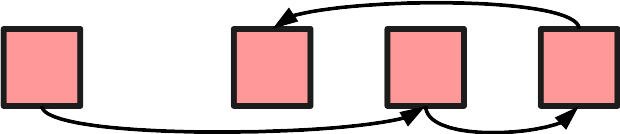
Alternatively there are linked lists. Here we store items inside small containers, which also store pointers to other containers. Access to specific items is tricky, since we need to iterate through the list until we find it. We also need a little extra memory to store the pointers (well, references, but close enough).
In return, we can fit the items anywhere in memory, making much more efficient use of free space. Better yet, we can easily change an existing list by changing some pointers instead of moving actual data.
undefined

Ideal for our set. Well, almost, but we’ll come to that.
For now, lets implement a simple Set using a linked list.


public class Set<T>
{
    private class Item
    {
        internal readonly T Value;
        internal Item Next;
 
        internal Item(T value)
        {
            Value = value;
            Next = null;
        }
    }
 
    private Item _head;
 
    public Set()
    {
        _head = null;
    }
 
    public bool Add(T value)
    {
        Item prev = null;
        for (Item current = _head; !(current is null); prev = currentcurrent = current.Next)
            if (Equals(current.Valuevalue))
                return false;
 
        if (prev is null)
            _head = new Item(value);
        else
            prev.Next = new Item(value);
 
        return true;
    }
 
    public bool Contains(T value)
    {
        for (Item current = _head; !(current is null); current = current.Next)
            if (Equals(current.Valuevalue))
                return true;
 
        return false;
    }
 
    public bool Remove(T value)
    {
        Item prev = null;
        for (Item current = _head; !(current is null); prev = currentcurrent = current.Next)
        {
            if (!Equals(current.Valuevalue))
                continue;
 
            if (prev is null)
                _head = _head.Next;
            else
                prev.Next = current.Next;
 
            return true;
        }
 
        return false;
    }
}

And there it is.
A nested class Item to use as node in our linked list, and three methods to manipulate said list.
All of them return a boolean telling us whether or not the item was part of the set prior to executing the method.


Time to introduce a little twist: An array!
But why? After all, didn’t we use a linked list to avoid using arrays?

My best guess is performance.
I do not know the full reasoning behind this implementation in the official HashSet, but I can see the advantages it brings especially for memory (including the GC’s workload).
It is NOT needed for the hash part later. Not this array, at least.

But I digress.
Think back on the structure of a linked list. Now imagine that all those individual containers weren’t spread all over the memory, but arranged in a single line.
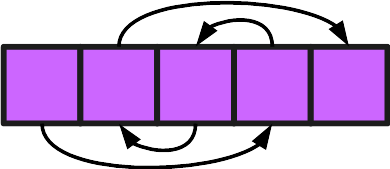
It is still a linked list. The order of items is determined by their references, not their position in memory.
Doesn’t this look just like an array?


Let’s start the implementation with an array to “reserve” a chunk of memory, in which we can place items for our linked list. This means that we can use indices inside that array instead of pointers. Which in turn makes it very easy to use a struct instead of a class for our nodes.

private struct Item
{
    internal T Value;
    internal int Next;
}
 
private Item[] _items;

You can imagine _items to be a pool of Items, some in use, others free to take.
The challenge this presents us with is to manage this pool:
How do we find free items?
We could add a flag in Item, or use a big bit mask in Set.
Aside from the memory overhead those would add, they only tell us whether a specific item is in use. We still need to search the array for one.
There is however an easy solution that uses almost no extra memory and gives us quick access to the next free item:
A second linked list in the same array!

The basic idea is, that we have one list of items for our set, and one list of free items. All items in the array are always part of one of those two.
Whenever we add a value to the set, we take an item from the start of the free list.
Whenever we remove a value, we move it’s item back to the free list.

private int _head;
private int _freeHead;
 
public Set()
{
    _items = new Item[10];
 
    _head = -1;
    _freeHead = _items.Length - 1;
 
    for (int i = _freeHeadi >= 0; --i)
        _items[i].Next = i - 1;
}
 
public bool Add(T value)
{
    int prev = -1;
    int current = _head;
    for (; current >= 0; prev = currentcurrent = _items[current].Next)
        if (_items[current].Value.Equals(value))
            return false;
 
    int added = _freeHead;
    _freeHead = _items[_freeHead].Next;
 
    if (prev < 0)
        _head = added;
    else
        _items[prev].Next = added;
 
    _items[added].Value = value;
    _items[added].Next = -1;
 
    return true;
}
 
public bool Contains(T value)
{
    for (int current = _headcurrent >= 0; current = _items[current].Next)
        if (_items[current].Value.Equals(value))
            return true;
 
    return false;
}
 
public bool Remove(T value)
{
    int prev = -1;
    for (int current = _headcurrent >= 0; prev = currentcurrent = _items[current].Next)
    {
        if (!_items[current].Value.Equals(value))
            continue;
 
        if (prev < 0)
            _head = _items[current].Next;
        else
            _items[prev].Next = _items[current].Next;
 
        _items[current].Next = _freeHead;
        _freeHead = current;
 
        return true;
    }
 
    return false;
}

This does work quite nicely.
Except for one crucial flaw: A constant size.
The Add method above assumes there will always be another free item.
But we initialize the array with a fixed length of 10…


What we need now is a similar function to what we have in List, to dynamically increase the size of our array when needed.

private void Grow()
{
    Item[] newArray = new Item[GetNextLength()];
 
    Array.Copy(_items, newArray, _items.Length);
 
    newArray[_items.Length].Next = _freeHead;
    _freeHead = newArray.Length - 1;
 
    for (int i = _freeHeadi > _items.Length; --i)
        newArray[i].Next = i - 1;
 
    _items = newArray;
}
 
public bool Add(T value)
{
    int prev = -1;
    int current = _head;
    for (; current >= 0; prev = currentcurrent = _items[current].Next)
        if (_items[current].Value.Equals(value))
            return false;
 
    if (_freeHead < 0)
        Grow();
 
    int added = _freeHead;
    _freeHead = _items[_freeHead].Next;
 
    if (prev < 0)
        _head = added;
    else
        _items[prev].Next = added;
 
    _items[added].Value = value;
    _items[added].Next = -1;
 
    return true;
}

How does it grow, though? Double the size like List?
Not quite, HashSet is a little peculiar about this.
The new size it chooses is a prime number greater than or equal to double the current size, with an initial size of at least 3.
But not always the first prime. Up to a value of 7199639 primes are read from a static int array, which skips a lot of them. Any primes greater than that are calculated.
(We’re going to change those rules a bit and stick to the basic prime number idea).


To finish up the Set, let’s add a few details. These will pretty much mirror what HashSet does.

First, a counter to tell us the total amount of items.
We can simply use an internal integer to in- or decrement with every successful Add or Remove.

Secondly, we make a slight change to our “references”, by which i mean the indices of specific items in the array.
Instead of storing the actual index, we’ll store the index+1. So a reference to the second item is stored as 2, a reference to the first as 1 and a lack of any reference (what we used -1 for up to now) is stored as 0.
This is done to make the default value of Item.Next reference nothing, foregoing the need to change that value after initializing a new array.

This ties into our third change, in which we add an index for the lowest, untouched item in our array “pool”.
Essentially this allows us skip preparing the free items list.
When we need a free item, but the free list is empty, we can refer to the lowest untouched index.
Whenever we remove an item it is added to the free items list, to be used by the next add.
Basically we try to take up all the space in the lower part off the array first, moving into higher indices only when we run out of space.

Our Set now looks like this:

public class Set<T>
{
    private struct Item
    {
        internal T Value;
        internal int Next;
    }
 
    private Item[] _items;
 
    private int _head;
    private int _freeHead;
    private int _lowestUntouchedIndex;
    private int _count;
 
    public int Count => _count;
 
    public Set()
    {
        _items = new Item[0];
 
        _head = 0;
        _freeHead = 0;
        _lowestUntouchedIndex = 0;
        _count = 0;
    }
 
    public bool Add(T value)
    {
        int prev = 0;
        for (int current = _headcurrent > 0; prev = currentcurrent = _items[current - 1].Next)
            if (_items[current - 1].Value.Equals(value))
                return false;
 
        int added;
        if (_freeHead > 0)
        {
            added = _freeHead;
            _freeHead = _items[_freeHead - 1].Next;
        }
        else
        {
            if (_lowestUntouchedIndex >= _items.Length)
                Grow();
 
            added = ++_lowestUntouchedIndex;
        }
 
        if (prev < 1)
            _head = added;
        else
            _items[prev - 1].Next = added;
 
        _items[added - 1].Value = value;
        _items[added - 1].Next = 0;
 
        ++_count;
        return true;
    }
 
    public bool Contains(T value)
    {
        for (int current = _headcurrent > 0; current = _items[current - 1].Next)
            if (_items[current - 1].Value.Equals(value))
                return true;
 
        return false;
    }
 
    public bool Remove(T value)
    {
        int prev = 0;
        for (int current = _headcurrent > 0; prev = currentcurrent = _items[current - 1].Next)
        {
            if (!_items[current - 1].Value.Equals(value))
                continue;
 
            if (prev < 1)
                _head = _items[current - 1].Next;
            else
                _items[prev - 1].Next = _items[current - 1].Next;
 
            _items[current - 1].Next = _freeHead;
            _freeHead = current;
 
            --_count;
            return true;
        }
 
        return false;
    }
 
    private void Grow()
    {
        Item[] newArray = new Item[GetNextLength()];
 
        Array.Copy(_items, newArray, _items.Length);
 
        _items = newArray;
    }
 
    private int GetNextLength()
    {
        int c = _items.Length * 2 + 1;
        for (; Enumerable.Range(2, (int)Math.Sqrt(c)).Any(d => c % d == 0); ++c) { }
        return c;
    }
}

A fully functional, fairly optimized Set.
The largest performance sink is the time it takes to iterate through items to find a specific value. If only there was a way to….


Right, the hash part.
Finally here.

Let’s use an example:
Imagine a set that contains all integers from 1 to 100.
If we want to look for a specific value in this set, we’ll have to iterate through the entire linked list until we either find a match, or reach the end.
Best case: 1 iteration
Worst case: 100 iterations

Now imagine our set being actually two sets (or more accurately, two linked lists in the same set):
One for values from 1 to 50, and one for 51 to 100.
Now whenever we want check for a value, we can simply choose which one to look in beforehand.
Best case: Still 1 iteration
Worst case: Now only 50 iterations

And why stop at two? Three sets? Ten? Why not one hundred?


The difficult part is the decision which set to use for a particular value.
An that is where we finally make use of a hash.

Every object in C# inherently allows us to use GetHashCode to generate an integer.
Objects with the same values always generate the same hash code, but different objects (ideally) generate different hash codes.

And how do we relate those to a specific linked list?
By using them as the index in an array of “pointers”.
Instead of a single field to store the head of a list, we now use an array to store several heads of as many lists as we like.

private int[] _mapping;

Using a simple modulo we can associate different hash codes with different positions in this array.

private int GetMappingIndex(T value)
{
    int hashCode = value.GetHashCode();
    if (hashCode < 0)
        hashCode = -hashCode;
 
    return hashCode % _mapping.Length;
}

Keep in mind that hash codes might be negative. Here we simply invert the value if it is negative. Below we’ll do it like HashSet and clear the sign bit.

As a consequence of having the length of our array influence the calculated index, we have to redo the entire mapping every time our HashSet grows.

private void Grow()
{
    Item[] newArray = new Item[GetNextLength()];
 
    Array.Copy(_items, newArray, _items.Length);
 
    _items = newArray;
 
 
    _mapping = new int[_items.Length];
 
    for (int i = 0; i < _lowestUntouchedIndex; ++i)
    {
        int mappedIndex = GetMappingIndex(_items[i].Value);
        _items[i].Next = _mapping[mappedIndex];
        _mapping[mappedIndex] = i + 1;
    }
}

Only one detail left before we’re done here.
In the code above, we’re calling GetHashCode again for items we’ve already processed, whenever the size changes. For complex objects this might be a non-trivial calculation and waste time.
Instead, items will store not only a value, but their hash as well, allowing us to simply reuse the stored hash, instead of regenerating it.
Since we already have the hash, we can also improve equality checks with it. Comparing two integers is an easy, quick operation. Not all comparisons are. If the hash of two objects is different, we don’t need to compare them to know they’re not equal.

public class HashSet<T>
{
    private struct Item
    {
        internal T Value;
        internal int HashCode;
        internal int Next;
    }
 
    private Item[] _items;
 
    private int[] _mapping;
 
    private int _freeHead;
    private int _lowestUntouchedIndex;
    private int _count;
 
    public int Count => _count;
 
    public HashSet()
    {
        _items = new Item[3];
        _mapping = new int[_items.Length];
 
        _freeHead = 0;
        _lowestUntouchedIndex = 0;
        _count = 0;
    }
 
    public bool Add(T value)
    {
        if (Contains(value))
            return false;
 
        int added;
        if (_freeHead > 0)
        {
            added = _freeHead;
            _freeHead = _items[_freeHead - 1].Next;
        }
        else
        {
            if (_lowestUntouchedIndex >= _items.Length)
                Grow();
 
            added = ++_lowestUntouchedIndex;
        }
 
        (int index, int hashCode) = GetMappingIndex(value);
 
        _items[added - 1].Value = value;
        _items[added - 1].HashCode = hashCode;
        _items[added - 1].Next = _mapping[index];
        _mapping[index] = added;
 
        ++_count;
        return true;
    }
 
    public bool Contains(T value)
    {
        (int index, int hashCode) = GetMappingIndex(value);
        for (int current = _mapping[index]; current > 0; current = _items[current - 1].Next)
            if (_items[current - 1].HashCode == hashCode && _items[current - 1].Value.Equals(value))
                return true;
 
        return false;
    }
 
    public bool Remove(T value)
    {
        (int index, int hashCode) = GetMappingIndex(value);
        int prev = 0;
        for (int current = _mapping[index]; current > 0; prev = currentcurrent = _items[current - 1].Next)
        {
            if (_items[current - 1].HashCode != hashCode || !_items[current - 1].Value.Equals(value))
                continue;
 
            if (prev < 1)
                _mapping[index] = _items[current - 1].Next;
            else
                _items[prev - 1].Next = _items[current - 1].Next;
 
            _items[current - 1].Next = _freeHead;
            _freeHead = current;
 
            --_count;
            return true;
        }
 
        return false;
    }
 
    private (int Indexint HashCodeGetMappingIndex(T value)
    {
        int hashCode = value?.GetHashCode() ?? 0;
        hashCode &= 0x7FFFFFFF;
        int index = hashCode % _mapping.Length;
 
        return (index, hashCode);
    }
 
    private void Grow()
    {
        Item[] newArray = new Item[GetNextLength()];
 
        Array.Copy(_items, newArray, _items.Length);
 
        _items = newArray;
 
 
        _mapping = new int[_items.Length];
 
        for (int i = 0; i < _lowestUntouchedIndex; ++i)
        {
            int mappedIndex = _items[i].Next % _mapping.Length;
            _items[i].Next = _mapping[mappedIndex];
            _mapping[mappedIndex] = i + 1;
        }
    }
 
    private int GetNextLength()
    {
        int c = _items.Length * 2 + 1;
        for (; Enumerable.Range(2, (int)Math.Sqrt(c)).Any(d => c % d == 0); ++c) { }
        return c;
    }
}

And that’s it!
This is pretty much how HashSet works.
Well this and a lot of different methods to interact with the set, like intersections. But apart from some some fancy helper classes to handle bitmasks, i don’t think there is anything interesting for me to show you.
Most of the time it boils down to enumerating a bunch of items and performing one of the three basic operations with them.

My personal highlight is the linked list in an array.
Very confusing the first time i saw it.
But the idea has actually found a use in one of my projects recently, making it a nice companion to the “wrap object in struct” performance boost.

Explained

List

The following references the implementation of System.Collections.Generic.List<T> in the .NET Framework 4.8, as it is shown here: https://referencesource.microsoft.com/#mscorlib/system/collections/generic/list.cs,cf7f4095e4de7646
The code below is simplified to show the ideas. No verification, exception handling, optimizations, etc. In other words: unsafe.
Please do not use in your project as is.


What problem is List trying to solve?
Basically, the fixed size of arrays.
To do so, List uses an array to store data and offers convenient methods to copy it into a larger arrays, should the old one not have enough space anymore. Simple, right?
Right.
No, really. There’s no catch here. It really is that simple.

However, that doesn’t mean you can’t benefit from knowing some of the implementation details!
So let’s create our own version of List and try to see how the “official” version handles different problems.


We’re going to start with a naive approach:

public class List<T>
{
    private T[] _container;
 
    public T this[int index]
    {
        get => _container[index];
        set => _container[index] = value;
    }
 
    public int Size => _container.Length;
 
    public List()
    {
        _container = new T[0];
    }
 
    public void Add(T item)
    {
        T[] newContainer = new T[_container.Length + 1];
 
        Array.Copy(_container, newContainer, _container.Length);
 
        newContainer[_container.Length] = item;
 
        _container = newContainer;
    }
}

Technically it works, but allocating space for a new array takes time.
Since we’re probably going to add quite a few items over the lifetime of this List, we should always allocate a bit more space than needed, so we have a buffer that can fill up instead without bothering the memory so much.

This is the first detail you might be interested in:
How much extra space do we allocate?
If we take too much, we’re wasting memory.
If we take too little, we might need to allocate space again, wasting time (and for a brief time occupy all the old and new memory).

In a specific use case you might be able to predict the usage of your List, in which case you can benefit from your own implementation.
For a general purpose library however, there is no ideal answer.

The Framework has a rather straightforward solution:
Need more space? Double what you have!

public class List<T>
{
    private T[] _container;
 
    private int _usedSpace;
 
    public T this[int index]
    {
        get => _container[index];
        set => _container[index] = value;
    }
 
    public int Size => _usedSpace;
 
    public List()
    {
        _container = new T[0];
        _usedSpace = 0;
    }
 
    public void Add(T item)
    {
        if (_usedSpace < _container.Length)
        {
            _container[_usedSpace++] = item;
            return;
        }
 
        T[] newContainer = new T[_usedSpace < 1 ? 1 : _usedSpace * 2];
 
        Array.Copy(_container, newContainer, _container.Length);
 
        newContainer[_usedSpace++] = item;
 
        _container = newContainer;
    }
}

That’s it. A new field is needed to keep track of how much of the array is actually used, and at which index the buffer starts.
Don’t forget our List might contain 0 items. Add a minimum initial size for adding items!
(The Framework uses a default of 4 items, by the way)

On a different note, did you notice how we move the data between arrays?
The Framework uses the same approach. Pretty much every operation is using Array.Copy.


One more thing that doesn’t come up often:
How do we handle adding/removing several items at once?
The official List has two (and a half) methods that accept IEnumerable. What happens to those?

The important part first: The default approach is to enumerate through all items and process each as it’s own thing. This way isn’t exactly efficient, but in some cases there is no other way (when you can’t enumerate again and don’t know how many additions you’re going to make).

However, if your IEnumerable is actually a type of ICollection, things get easier. Now we have access to Count, which means we can plan ahead. At most we need to create a bigger array once and can use a single Array.Copy to transfer the data.

public void Add(T item)
{
    IncreaseSize(1);
 
    _container[_usedSpace++] = item;
}
 
public void Add(IEnumerable<Titems)
{
    if (items is ICollection<T> collection)
    {
        if (collection.Count == 0)
            return;
 
        IncreaseSize(collection.Count);
 
        collection.CopyTo(_container_usedSpace);
 
        _usedSpace += collection.Count;
    }
    else
    {
        foreach (T item in items)
            Add(item);
    }
}
 
private void IncreaseSize(int additionalSpaceNeeded)
{
    if (_usedSpace + additionalSpaceNeeded <= _container.Length)
        return;
 
    int newSize = _container.Length * 2;
 
    if (_usedSpace + additionalSpaceNeeded > newSize)
        newSize = _usedSpace + additionalSpaceNeeded;
 
    T[] newContainer = new T[newSize];
 
    Array.Copy(_container, newContainer, _container.Length);
 
    _container = newContainer;
}

As you can see, we’ve added an overload for Add that accepts an IEnumerable, as well as a dedicated method for increasing our container space (to avoid duplicate code).


Inserting items at specific positions or removing them is basically just moving the values inside the container back and forth using Array.Copy, nothing fancy to see here.

And with that you already have a simple List.
The official version has of course more than this.
That means on one side more care for special cases, like the size growing beyond the limit of an int. On the other it includes fancy methods for searching and sorting – which you might find are being delegated to Array, since under the hood you’re using one anyway.


Conclusion:
The List implementation is rather straightforward. No big surprises or mind benders.
Personally, what i took away from it are the growth rate, and how it can pay off to use the TrimExcess method to keep it in check, as well as a renewed confidence in AddRange.